
































For newsrooms the priorities differ from typical marketing sites. The main criteria to check:
1. Latency & Realtime — publish updates, breaking news, and Realtime feeds with minimal propagation delay.
2. Editorial workflow — in-browser preview, scheduled publishing, role-based workflows, multi-author concurrency.
3. Scalability & CDN — sudden traffic spikes (breaking news) mustn’t crash your site.
4. Multi-channel & Syndication — push content to mobile apps, AMP, newsletters, social, third-party APIs.
5. Localization & SEO — multi-language support (Indian languages), canonical handling, metadata control.
6. Integrations — analytics, ads, paywalls, comment systems, video & image CDNs, and newsroom tools.
7. Cost & Support — enterprise SLAs vs open-source self-hosting costs; availability of regional partners/agencies.
8. Security & Compliance — GDPR-like concerns, content retention, backups.
Quick shortlist for different newsroom needs
- Lean / Indian regional publishers (fast to ship, low cost): Strapi, WordPress (headless), Ghost.
- Developer-first, real-time & structured content: Sanity, Hygraph (GraphCMS), Directus.
- Editor-friendly (visual editing / block building): Storyblok, DatoCMS, Prismic.
- Enterprise, global scale, heavy integrations & SLAs: Contentful, Contentstack, Kontent.ai, Brightspot, Amplience.
- Self-host & full data control: Directus, Keystone, Payload, Strapi (self-hosted).
Top 30 headless CMS
1. Contentful
Positioning: Popular hosted, enterprise-grade headless CMS.
Pros: mature APIs, good CDN integrations, strong marketplace and enterprise support.
Cons: pricing scales quickly at enterprise scale; editorial UX can feel developer-centric for non-technical editors. Ghost.com
2. Strapi
Positioning: Open-source, Node.js, highly customizable, self-hostable.
Pros: full control of data & hosting, no vendor lock-in, active community, easy dev onboarding.
Cons: you own infra/maintenance; need engineering resources for scaling and advanced features. Maven-silicon.com
3. Sanity
Positioning: Developer-first with realtime collaboration and a customizable studio.
Pros: real-time editing, structured content model, strong query power (GROQ), publisher-friendly when configured.
Cons: Studio customization has a learning curve; hosted limits can apply at scale.
4. Storyblok
Positioning: Visual editor + component-based content (good for editors who build pages with blocks).
Pros: visual page builder, component system, good for multi-author editorial teams.
Cons: hosted pricing; complex component architecture can require dev discipline. Strapi.io
5. Prismic
Positioning: Hosted, API-driven CMS with slice-based design pattern.
Pros: easy content modeling, good editorial previews, quick to ship.
Cons: some API rate limits and pricing at scale; less suited to highly custom backend logic.
6. Contentstack
Positioning: Enterprise headless with strong SLAs and editorial tooling.
Pros: enterprise features, workflows, strong integrations, proven at large publishers.
Cons: premium pricing, onboarding time and vendor dependence.
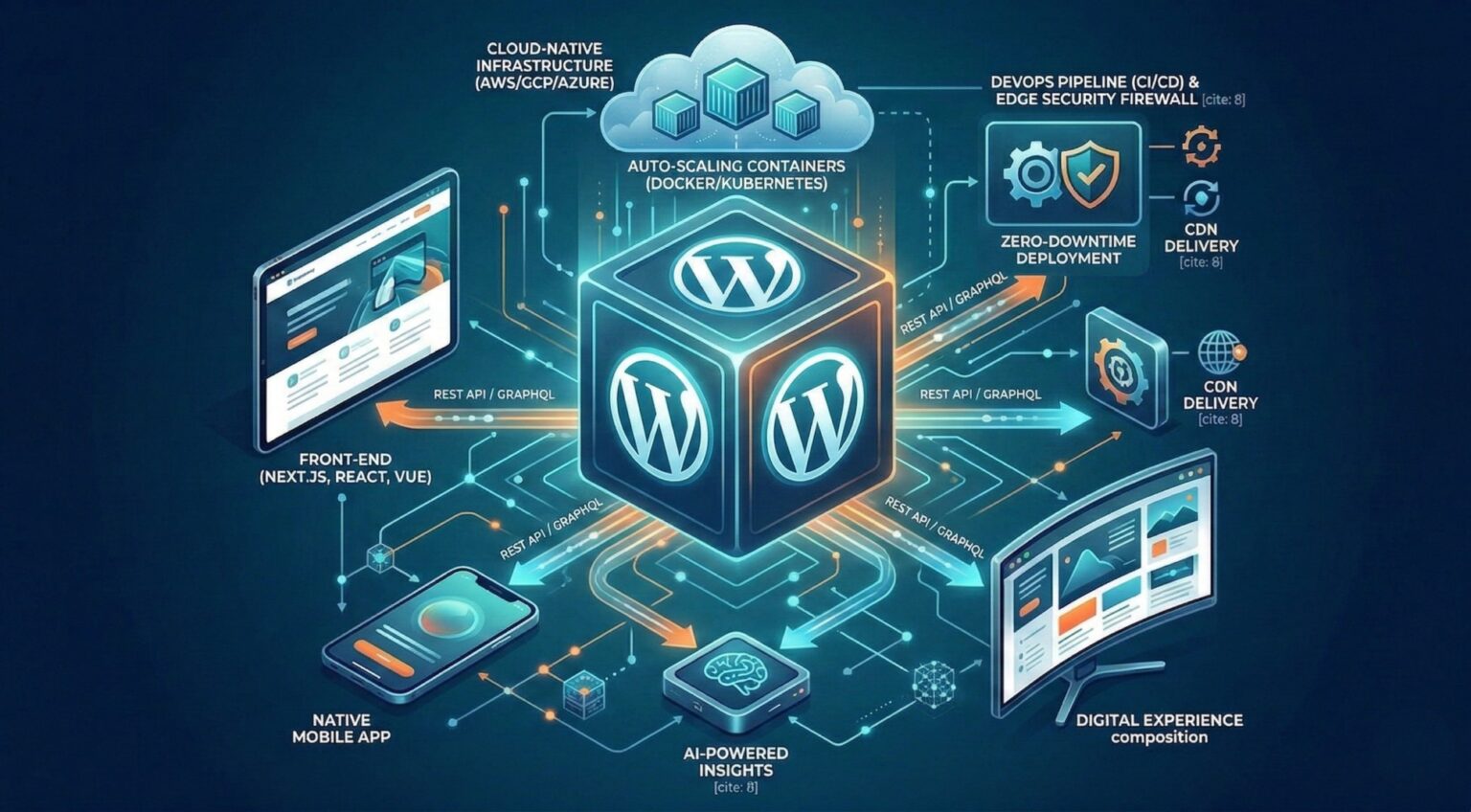
7. WordPress (headless via REST/GraphQL)
Positioning: Familiar publishing tool used headlessly by many media organizations.
Pros: editorial workflows, plugins, huge ecosystem, easy author adoption.
Cons: can be slower unless decoupled and optimized; security/maintenance overhead if self-hosted. Widely used by publishers in hybrid setups. Exdera.ai
8. Ghost (headless mode)
Positioning: Lightweight publishing platform that supports headless use.
Pros: great for article-first sites, simple authoring, good performance.
Cons: not feature-rich for complex multi-channel enterprise needs (paywalls and complex workflows need add-ons). Ghost.com
9. Directus
Positioning: Open-source data-first headless CMS that wraps SQL databases.
Pros: full data ownership, flexible, good for complex schemas and existing DBs.
Cons: requires engineering for custom frontends and scaling patterns.
10. DatoCMS
Positioning: Hosted, focused on editors with strong image & media handling.
Pros: great media management, good editorial UX and API performance.
Cons: cost at scale; enterprise features limited vs top-tier enterprise vendors.
11. Hygraph (formerly GraphCMS)
Positioning: GraphQL-native headless CMS.
Pros: great for GraphQL-centric stacks, fast queries, type-safe content models.
Cons: hosted pricing; requires GraphQL familiarity.
12. Kontent.ai (Kentico)
Positioning: Enterprise headless with advanced editorial & localization tools.
Pros: strong localization, workflows, enterprise integrations.
Cons: cost and complexity — better for larger media groups.
13. ButterCMS
Positioning: Simple hosted headless CMS for rapid setup.
Pros: fast to start, simple API, low onboarding friction.
Cons: less flexible than developer-first platforms for complex content models.
14. Magnolia
Positioning: Enterprise CMS with hybrid headless capabilities.
Pros: strong personalization, enterprise integration, publishing tools.
Cons: heavy and costly; overkill for smaller publishers.
15. Agility CMS
Positioning: Headless with emphasis on scripting and page management.
Pros: flexible, good for marketing and editorial hybrid needs.
Cons: hosted model and pricing tradeoffs.
16. Brightspot
Positioning: Tailored to large publishers — editorial-first features out-of-the-box.
Pros: built for newsrooms, rich editorial workflow, migration support.
Cons: enterprise-level cost and implementation time.
17. Netlify CMS
Positioning: Git-based CMS for JAMstack sites (open source).
Pros: great for static sites, versioned content in Git, low cost.
Cons: not ideal for large newsroom workflows or non-technical editors.
18. KeystoneJS
Positioning: Open-source Node.js CMS with a developer-first admin UI.
Pros: highly customizable, self-hostable, good for teams building bespoke systems.
Cons: less out-of-the-box editorial polish; needs dev bit to get full newsroom features.
19. Payload CMS
Positioning: Node.js, schema-driven, self-hosted headless CMS.
Pros: modern developer ergonomics, flexible access control.
Cons: smaller ecosystem; team must implement publishing workflows.
20. Squidex
Positioning: Open-source headless CMS with event-sourcing and multi-tenant capabilities.
Pros: good for extensibility and event-driven architectures.
Cons: less editorial UX refinement, steeper setup.
21. Cockpit CMS
Positioning: Lightweight, self-hosted headless CMS (API-driven).
Pros: simple to run, lightweight footprint.
Cons: limited advanced editorial features.
22. ApostropheCMS
Positioning: Modular CMS with in-context editing and headless options.
Pros: good in-page editing for content-heavy sites.
Cons: smaller community, more niche.
23. Bloomreach (formerly Hippo / Bloomreach Content)
Positioning: Enterprise digital experience and content platform.
Pros: personalization, commerce integrations, strong enterprise features.
Cons: expensive and complex; aimed at large-scale enterprises.
24. Zesty.io
Positioning: SaaS headless CMS with multi-site management.
Pros: multi-site friendly, CDN-backed, fast setup.
Cons: vendor lock-in risk, pricing for scale.
25. Amplience
Positioning: Focus on rich media and commerce-driven headless content.
Pros: media performance, CDN, very good for content-rich experiences.
Cons: cost and complexity; suited to enterprise publishers with heavy media.
26. CoreMedia
Positioning: Enterprise content platform with hybrid headless options.
Pros: strong enterprise integrations, personalization.
Cons: implementation-heavy and costly.
27. Oracle Content Management
Positioning: Enterprise content platform as a part of Oracle stack.
Pros: enterprise support and integration, security and SLA.
Cons: high cost and vendor lock-in.
28. Umbraco Heartcore
Positioning: Headless offering from Umbraco (traditional .NET CMS vendor).
Pros: familiar CMS experience with headless API, .NET ecosystem for some publishers.
Cons: Niche in India compared to Node/JS platforms; hosting stack constraints.
29. Cosmic (Cosmic JS)
Positioning: Simple hosted headless CMS for developers.
Pros: easy to prototype, simple content models.
Cons: less enterprise feature richness.
30. Craft CMS (headless mode)
Positioning: Traditionally monolithic but supports headless setups (via APIs).
Pros: excellent editorial experience, custom fields and templating.
Cons: typically used with PHP stacks; headless setup requires additional configuration for multi-channel distribution.
How to choose — practical checklist for Indian newsrooms
- Start with core use cases — do you need Realtime breaking-news propagation, heavy video, paywall, or multilingual support? Rank features.
- Prototype — choose 2–3 finalists (one open-source self-hosted, one hosted developer-first, one editor-first) and build a 1–2 week pilot for article publishing + breaking update workflow.
- Measure — CDN latency, editorial publish time (author → live), cost per million API calls, and ease of localization in Indian languages.
- Integrations — confirm connectors for your ad server, paywall (e.g., Piano), analytics, image CDN (Cloudinary), video hosting (Mux), and comment systems.
- Run a traffic spike test — simulate peak traffic (breaking news) or confirm vendor will support it.
- Plan for backups & export — ensure content portability (important for archives and legal reasons).
Recommendations (short & actionable)
- If you want fast, cheap, and editor-friendly with minimal infra: WordPress headless or Ghost (if you mainly publish text & newsletters).
- If you want developer control + self-host (cost predictable for scale): Strapi or Directus.
- If you want real-time collaboration and structured content for complex multi-channel publishing: Sanity or Hygraph.
- If you’re an enterprise newsroom (large audience, paywall, advanced personalization): evaluate Contentful, Contentstack, Kontent.ai, Brightspot, Amplience and plan for a 3–6 month implementation.
| CMS | Popularity (1–5) | Tech stack & extensions | Performance (1–5) | Community (1–5) | Enterprise scaling | Time-to-market (1–5) | AI Native Capabilities | AI Content Creation | Primary Purpose / Focus |
| Contentful | 5 | SaaS, REST + GraphQL, JS SDKs, CDN, plugins | 5 | 4 | Yes | 4 | Limited (beta) | Via integrations | Enterprise publishing, omnichannel |
| Strapi | 5 | Node.js, REST + GraphQL, plugins | 4 | 5 | Partial (enterprise) | 4 | No native AI | Add-ons (plugins) | Flexible, open-source API CMS |
| Sanity | 4 | React Studio, GROQ, APIs | 5 | 4 | Yes | 4 | Limited (AI Assist beta) | Yes (editorial workflows) | Newsrooms, editorial workflows |
| Storyblok | 4 | SaaS, visual editor, REST + GraphQL | 4 | 4 | Yes | 5 | Yes (AI text/images) | Yes | Visual content mgmt, media |
| Prismic | 4 | SaaS, REST + GraphQL | 4 | 3 | Partial | 4 | Limited (AI helper) | Via integrations | Slice-based CMS for fast publishing |
| Contentstack | 4 | SaaS, GraphQL, enterprise connectors | 5 | 3 | Yes | 3 | Yes (AI Copilot) | Yes | Enterprise content hub |
| WordPress (headless) | 5 | PHP, REST/GraphQL, plugins | 3–4 | 5 | Yes | 5 | Limited (Jetpack AI) | Yes (plugins) | Blogs, news, portals |
| Ghost | 3 | Node.js, REST API | 4 | 3 | Partial | 5 | No | Via Zapier/AI plugins | Publishing, subscriptions |
| Directus | 3 | SQL wrapper, REST + GraphQL | 4 | 4 | Partial | 3 | No | Limited | Data-driven content APIs |
| DatoCMS | 3 | SaaS, GraphQL | 4 | 3 | Partial | 4 | Limited | Via API | Media-rich publishing |
| Hygraph | 3 | GraphQL-native SaaS | 5 | 3 | Yes | 4 | No | Integrations | API-first structured content |
| Kontent.ai | 3 | SaaS, REST + GraphQL | 4 | 3 | Yes | 3 | Yes (AI features) | Yes | Enterprise editorial workflows |
| ButterCMS | 2 | SaaS, REST API | 4 | 2 | Partial | 5 | No | Limited | Quick content setup |
| Magnolia | 2 | Java hybrid, enterprise | 4 | 2 | Yes | 2 | Limited | Integrations | DXP, enterprise portals |
| Agility CMS | 2 | SaaS, REST/GraphQL | 4 | 2 | Partial | 4 | Limited | No | Hybrid CMS for multichannel |
| Brightspot | 2 | Java, newsroom focus | 4 | 2 | Yes | 2–3 | Yes (editorial AI) | Yes | News publishing, enterprise |
| Netlify CMS | 3 | Git-based, JAMstack | 5 | 4 | Partial | 4 | No | No | Developer-friendly Git CMS |
| KeystoneJS | 2–3 | Node.js, GraphQL/REST | 4 | 3 | Partial | 3 | No | No | Open-source, dev-first CMS |
| Payload CMS | 2 | Node.js, REST + GraphQL | 4 | 2–3 | Partial | 3 | No | No | Dev-friendly API CMS |
| Squidex | 2 | .NET Core, REST + GraphQL | 4 | 2 | Partial | 3 | No | No | Open-source enterprise CMS |
| Cockpit CMS | 1–2 | PHP API CMS | 3 | 2 | No | 4 | No | No | Lightweight self-host CMS |
| ApostropheCMS | 1–2 | Node.js, modular | 3 | 2 | Partial | 3 | No | No | WYSIWYG + modular CMS |
| Bloomreach | 2 | Java/SaaS DXP | 4 | 2 | Yes | 2 | Yes (AI search/personalization) | Yes | Commerce + content |
| Zesty.io | 1–2 | SaaS, multi-site | 4 | 1–2 | Partial | 4 | Limited | Limited | SaaS publishing CMS |
| Amplience | 2 | SaaS, media-first | 5 | 2 | Yes | 3 | Yes (AI media optimization) | Yes | Commerce + media |
| CoreMedia | 1–2 | Java DXP | 4 | 1–2 | Yes | 2 | Limited | Limited | Large-scale enterprise DXP |
| Oracle Content Mgmt | 2 | Oracle Cloud, APIs | 4 | 1–2 | Yes | 2 | Yes (GenAI integrations) | Yes | Enterprise cloud CMS |
| Umbraco Heartcore | 2 | .NET, REST APIs | 4 | 3 | Partial | 3 | Limited | Via plugins | .NET developer CMS |
| Cosmic (Cosmic JS) | 1–2 | SaaS, REST API | 4 | 2 | No | 5 | No | Via API | Fast-start API CMS |
| Craft CMS (headless) | 3 | PHP, REST APIs | 4 | 3 | Partial | 3 | Limited | Plugins | Creative publishing CMS |
